
Scheduling for Multiple Professionals: One Calendar, No Mix-Ups
The problem starts with your second professional
Multi-staff scheduling seems easy to handle, until the team grows. While it's just you in the chair, you can keep it all in your head: you know who's coming at 2 pm, who canceled, who's running late. Then a second barber joins. Then the nail tech, the stylist who only works Tuesdays and Thursdays, the professional who does beards but not kids' cuts. Within a week you have two clients booked at the same time with the same person, and a client swearing that "the girl on WhatsApp confirmed it".
Setting up multi-staff scheduling takes more than putting calendars side by side: each one has to respect the hours, services and days off of whoever is in that chair, without you in the middle passing messages along. That's exactly where most barbershops and salons get stuck: growth that should bring more revenue ends up as scheduling chaos and annoyed clients.
I'll show you how to solve this in a practical way, with truly independent schedules, letting clients choose who they want to see and tying it all to each professional's commission.
Why spreadsheets and notebooks don't scale
A paper appointment book works for one person. With three or four, every scribble is a risk. A client calls, someone jots it down on a sticky note, the sticky note falls off, and the appointment disappears.
A spreadsheet is a little better, but it still depends on someone having it open at the right moment. On a packed Saturday, nobody stops to update a cell. And neither one warns you when two clients want the same professional at the same time; you only find out when both walk through the door.
What breaks once you have more than one professional:
- Overlapping appointments: two bookings for the same person at the same minute.
- Ignored days off: someone books a Tuesday with the professional who only comes in on Thursdays.
- Wrong service: a client books a keratin treatment with someone who only does cuts.
- No overview: you can't quickly see who's fully booked and who has gaps in their schedule.
If you're still at that stage, it's worth reading how to organize your barbershop schedule without the chaos before moving on. Getting the basics organized helps a lot when you go digital.
How to set up scheduling for multiple professionals
Each professional has their own schedule, with their hours, working days and the services they perform. The system cross-checks all of that on its own before offering a slot to the client.
In RobotiZap, you add each professional once and set:
- The days and hours they work (including days off and lunch breaks).
- Which services they perform: cuts, beards, highlights, manicures, whatever it may be.
- The duration of each service per professional, because one person's cut may take 30 minutes and another's 45.
From then on, the virtual assistant never offers an impossible slot. If the professional doesn't work on Wednesdays, Wednesday doesn't show up. If they already have a client at 3 pm, that slot disappears from the list. No more Saturday panic when two clients show up for the same barber.
And it runs 24 hours a day on WhatsApp, on your business's official number. Clients don't download any app or fill in a sign-up form. They send a message like they would to anyone, and your schedule fills itself while you cut hair.
Two ways to serve clients, whichever suits you
The virtual assistant works in two modes, and you choose:
- Step-by-step: the client gets a menu and picks the service, then the professional, then the time. Direct and hard to get wrong, great for people who prefer a guided flow.
- Conversational AI: the client writes in their own words ("I'd like a beard trim with John on Friday afternoon") or sends a voice note, and the AI understands and handles it. It's like messaging your front desk, except it replies right away, any day and at any hour.
In both cases, the independent-schedule rules are the same. Only the way the client talks to it changes. If you want to understand this part better, take a look at WhatsApp AI booking: how it actually works.
Let the client choose the professional
Barbershop and salon clients are loyal to the person, not the address. He likes Peter's cuts. She trusts Julia with her blowouts. If your booking system doesn't let clients choose who they see, you're pushing them toward a professional they didn't ask for, and that leads to complaints or, worse, a lost client.
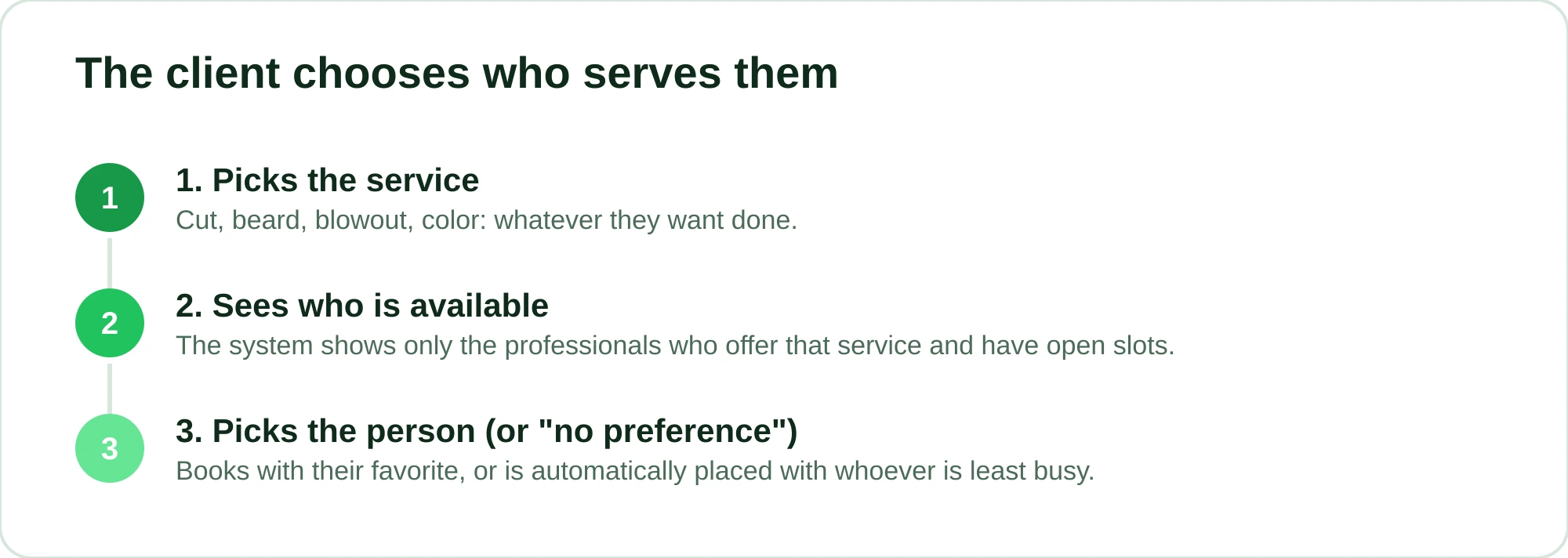
With professional selection turned on, the flow feels natural:
- The client picks the service.
- The system shows who performs that service and is available.
- The client picks the person (or chooses "no preference / first available").
That "no preference" option is gold for filling gaps in the schedule. Clients without a preference automatically go to whoever has an open slot, balancing the shop. Whoever is emptier gets more people, and you make better use of the space you're paying rent and utilities on anyway.
There's a management decision to make here: for some services it makes sense to lock them to a specific professional (your color specialist, for example). For others, opening them to everyone fills the schedule faster. The system lets you configure this service by service.
Commission per professional: schedule and payouts in one place
Separate schedules per person only close the loop when they turn into commission figures without you adding anything up by hand. Since each appointment is already recorded under the professional who performed it, the commission is calculated straight from that history.
In RobotiZap you can set commissions in three ways, and they work together:
| Commission type | When to use it |
|---|---|
| Global | The same percentage for everyone, simple to manage |
| Per service | Cuts pay one percentage, chemical services another |
| Per product | For when professionals sell pomade, shampoo, etc. |
At the end of the month, instead of digging through notebooks and trying to remember who did what, you look at what each professional handled and the commission is already calculated on the right service. Fewer arguments at payout time, fewer mistakes for or against you.
If you still calculate this by hand and want to understand the logic before automating it, these guides help:
- How to calculate barber commission (with examples)
- How to calculate hair stylist commission, step by step
The professional portal takes you out of the middle
One detail that changes day-to-day life: each professional can have access to their own portal. They open it, see their schedule, know who's coming and when, and don't need to ask you anything. You stop being the go-between for clients and the team.
It solves that classic scene: the barber arrives in the morning and asks "anyone booked with me today?". With the portal, they already know. And since each person sees only their own schedule, you can give them autonomy without opening up the whole business.
Fewer no-shows with a shop full of bookings
The more professionals, the more bookings, and the more no-shows if you don't keep an eye on it. A missed slot in a barber's schedule is money that won't come back that day.
RobotiZap tackles this from two sides:
- Automatic reminders before the appointment, with a confirmation request. Clients who confirm show up. Those who can't make it let you know in time to fit someone else in.
- Deposit collection through an online payment link (card) at the moment of booking. A client who left a deposit thinks twice before vanishing.
The effect on no-shows varies from shop to shop, but in many cases the drop is noticeable in the very first month, especially for long, expensive services, where a gap in the schedule hurts the most. If no-shows are your biggest problem right now, it's worth digging into how to reduce no-shows at your salon or barbershop.
What it costs and what you get back
RobotiZap has a single plan, with unlimited bookings and professionals. There's a free trial and no long-term contract.
Look at your own front desk. Every client who used to no-show and now confirms, and every empty slot filled by the "no preference" option, is revenue you keep. Add up the hours you spend each week answering "any openings with so-and-so?" on WhatsApp and rescheduling by hand. The AI that handles text and voice notes is included in the same plan; it isn't a separate add-on that inflates the bill.
Compared with systems that charge per professional or per number of bookings, having unlimited professionals on a single plan changes the math as your team grows. Compare what each option charges and delivers before you decide; the point here is that your cost doesn't go up with every new professional you hire.
And because RobotiZap is a Meta-certified Tech Provider, it runs on the official WhatsApp API. In practice, that means more protection against your business number being banned than with tools that connect from the outside, unofficially.
Try RobotiZap for free: set up your professionals and have your schedule taking bookings on its own today.
Frequently asked questions
Can each professional have different hours and days off?
Yes. Each professional has their own schedule, with their days, hours, lunch break and days off. The virtual assistant only offers clients the times when that person actually works, so there's no way to book on a day off or on top of another client.
Can clients choose who they want to see?
Yes. After choosing the service, they see which professionals perform it and are free, and they pick the person. They can also book with no preference, in which case the system places them with whoever has an open slot, which helps balance the shop.
How do commissions work with several professionals?
Each appointment is already recorded under the person who performed it, so the commission is calculated from that. You can use global, per-service or per-product commissions and close the month without adding anything up by hand.
Do I pay more for each new professional?
No. There's a single plan, with unlimited professionals and bookings. Hiring more people for your team doesn't raise your subscription.
Does the client need to download an app?
No. All booking happens on WhatsApp, on your business's official number. The client sends a message (or a voice note) like they would to anyone, with no app to install and no sign-up.