How to Organize Your Barbershop Schedule Without the Chaos
The paper book works until Saturday gets packed
Anyone looking up how to organize a barbershop schedule usually finds out how big the problem is on a Saturday. You know the scene: morning, three chairs busy, the phone ringing, someone at the door asking "can you fit John in now?" and you flipping through the appointment book to see where he'd fit. That packed Saturday is when you find out whether your schedule is organized or whether it turns into a scramble, double bookings and annoyed clients.
A paper book does the job when you work alone and business is steady. The trouble starts when the team and the demand grow: two barbers, one client who booked and another who just walked in, scribbles on top of scribbles, and that call nobody picked up because they had clippers in hand.
I'll show you how to bring order to it, from paper to digital, covering the points that cause the most confusion at the front desk: multiple barbers, walk-ins, breaks and blocked time.
How to organize your barbershop schedule: first, understand the mess
Before you organize anything, look at where the disorder comes from. It's almost always a mix of these:
- Everything goes through one person. If you're the only one writing appointments down, nobody books while you're cutting. Messages pile up and the reply goes out two hours later, when the client has already booked somewhere else.
- You can't see open slots at a glance. A client asks "anything tomorrow at 3 pm?" and you have to stop everything to check.
- Every barber keeps track their own way. One uses a notebook, another the notes app on his phone, a third keeps it all in his head. Then two clients land in the same slot.
- Guessed service times. A basic cut and a cut with beard and neck cleanup don't take the same time. When you block 30 minutes for everything, the whole day runs late.
- Walk-ins with no rules. Every "we'll squeeze you in" pushes the schedule back, and the client who booked properly ends up waiting on his feet.
Notice that working harder doesn't fix any of these. What's missing is a system that can handle Saturday traffic.
From paper to digital: a painless transition
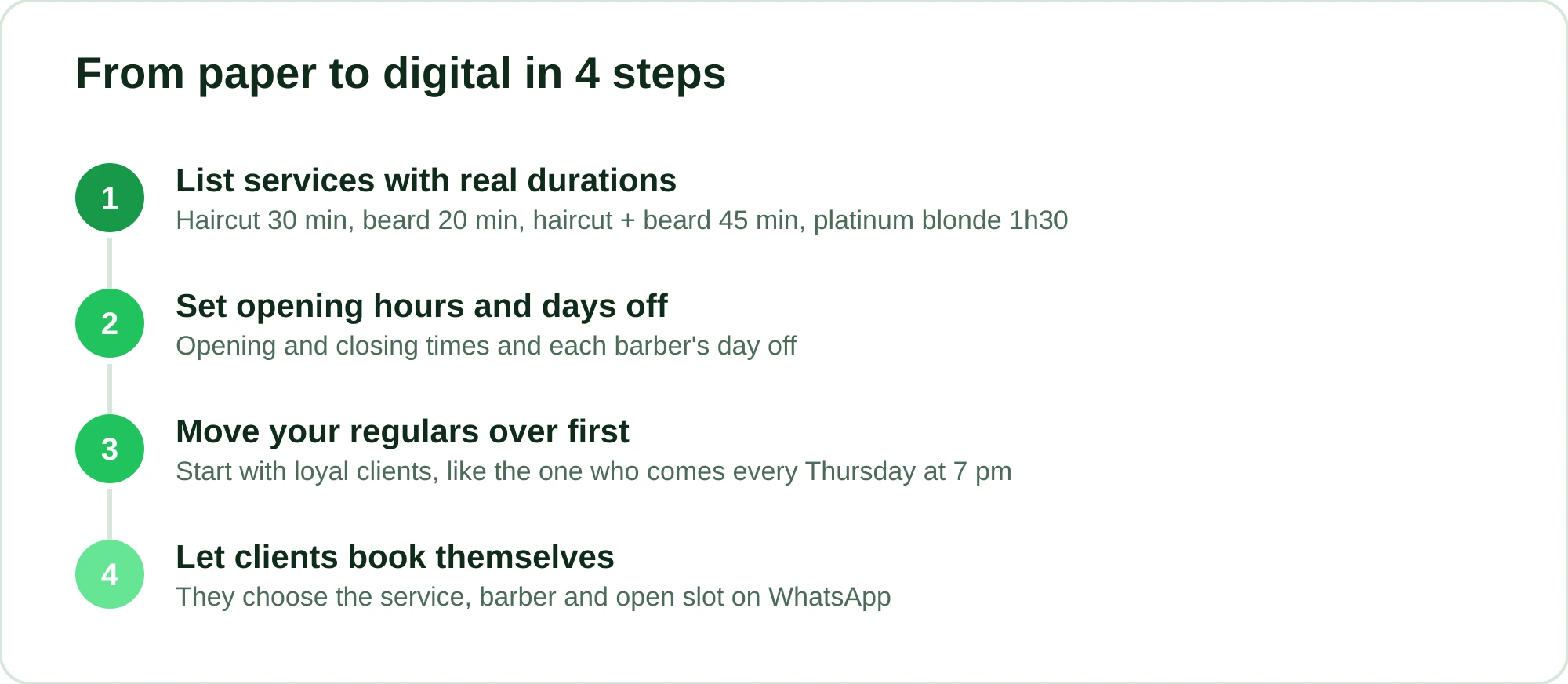
Swapping the paper book for a digital schedule is scarier in your head than in practice. You don't have to switch overnight. You can do it in stages.
1. List your services with the real time each one takes
Sit down for five minutes and write each service with an honest duration. Haircut 30 min, beard 20 min, haircut + beard 45 min, platinum blonde 1h30. That time is the foundation of everything: it's what keeps two clients from colliding in the same chair.
2. Set your opening hours and days off
When you open, when you close, which day each barber has off. It sounds obvious, but it's what stops the schedule from offering a slot that doesn't exist.
3. Move your regulars over first
That client who comes every Thursday at 7 pm? Set up his recurring visit first. Your loyal clients are the backbone of your week, and securing their slots makes the rest of the open time easier to see.
4. Let clients book themselves
This is the real game changer. Instead of you writing down every appointment by hand, the client picks an open slot and the schedule fills itself. No phone calls, no back-and-forth messages, no stopping a cut to reply.
This is where a WhatsApp assistant like RobotiZap comes in. The client messages the barbershop's number, picks the service, the barber and an open slot, and that's it: the booking lands in the schedule right away, even if you're mid-cut or it's 11 pm on a Sunday. No app to download, no sign-up. The client chats the way he'd chat with you, and it can even handle text or voice messages when he sends something loose like "want to book a beard trim Friday afternoon".
Multiple barbers, one schedule with no collisions
This is where most of the mess lives. With more than one professional, each needs their own schedule, but you need to see everything together.
What a digital schedule solves here:
- Each barber has independent hours. John can be fully booked while Pete has the afternoon free, and the system only offers what's actually open in each chair.
- The client chooses the professional. Clients loyal to a barber book straight with him. Those who just want a quick cut take the first open slot with anyone.
- No more double bookings. Since every booking takes the right chair for the right amount of time, two clients can't end up in the same slot.
If you have a team, take your time with Scheduling for Multiple Professionals: One Calendar, No Mix-Ups. And when it comes to splitting earnings, How to Calculate Barber Commission (With Examples) helps you close the month without arguments, because everything that went through the schedule is on record.
Walk-ins, breaks and blocked time: where the day jams (or doesn't)
Organizing the schedule isn't just filling slots. It's controlling three things that, handled badly, wreck the whole day.
Walk-ins
A good walk-in is one that fits without pushing back anyone who was already booked. When the schedule shows the real gaps (that 40-minute window between two clients), you fit in exactly who fits there, without delaying everyone else.
A good practice: keep one or two short slots per shift for emergencies, like the client heading to an event that night. If nobody uses them, you get a breather. If someone does, you take them without throwing off the day.
Breaks
Lunch, coffee, the time to clean your station between clients. If you don't block breaks, the schedule offers those slots and you end up eating a snack standing up while you cut. Block them. Breaks are as much a part of the schedule as haircuts.
Blocked time
A doctor's appointment, the bank, a day you'll come in late, a personal day off. Blocking the time takes it off the table before someone books it. Better to tell the schedule you won't be there than to call three clients to cancel later.
| Situation | Paper book | Digital schedule |
|---|---|---|
| A client wants to book while you're cutting | Left for later, sometimes forgotten | Books on their own, right away |
| Checking open slots at a glance | You have to open it and flip through | The client only sees what's open |
| Two barbers double-booked | It happens | It can't happen |
| Blocking off an afternoon | Cross it out and hope you remember | Disappears from availability automatically |
| Knowing who's booked for tomorrow | Count by hand | Ready-made list |
Fewer no-shows with reminders and confirmation
An organized schedule full of no-show gaps still loses money. A client who booked and didn't show costs you twice: you held the chair and turned away another client for that slot.
Two features tackle this head-on:
- Automatic reminders. The day before and on the day, the client gets a message reminding them of the appointment. A lot of no-shows are just forgetfulness, and a reminder solves much of it.
- Attendance confirmation. The client replies to confirm. If they say they can't make it, you free up the slot in time to fit someone else in.
For longer services or new clients, you can also collect a deposit up front through an online payment link (card). People who pay in advance disappear a lot less. In RobotiZap, reminders, confirmation and deposits are all automatic, so it's not one more manual task in your day.
And what it costs to get this running
Before you look at the system's price, do a different calculation: how much is today's mess already costing you? One empty chair on a Saturday from an unannounced no-show already hurts the register.
RobotiZap has a single plan, with unlimited bookings and professionals. There's no per-barber charge and no cap on appointments. You avoid no-shows and stop spending hours answering "any openings?" on WhatsApp. And because RobotiZap is a Meta-certified Tech Provider, it runs on the official WhatsApp API, which lowers the risk of the barbershop's number getting banned for using unofficial workarounds.
You can try it free, with no long-term contract. Add your services, connect your WhatsApp and watch your first client book on their own before you decide anything. If you'd like to compare options first, take a look at Best Barbershop Booking Software: How to Choose.
Start your RobotiZap free trial now and let the schedule organize itself while you cut.
Frequently asked questions
How do I organize a barbershop schedule with multiple barbers?
Each barber needs their own schedule, with independent hours, days off and services, but all in one place. With a digital schedule, the client chooses the professional and only sees the slots that are actually open in that chair, which removes the risk of two clients landing in the same slot. RobotiZap has this out of the box: you add each professional and the schedule keeps everything separate on its own.
Is it worth switching from a paper book to a digital schedule?
It is once you're past the point of working alone with steady business. If you already have a team, packed Saturdays, or you lose bookings because you can't reply in time, paper starts costing you in double bookings and lost clients. You can make the switch in stages: start by adding your services and loyal clients, and let the rest come in gradually.
How do walk-ins work in a barbershop schedule?
A walk-in means using the gaps between bookings without pushing back anyone who was already booked. With the right duration set for each service, the schedule shows exactly how much free time you have between clients, so you only fit in who fits there. Keeping one or two short slots per shift for emergencies also helps.
How do I keep clients from missing their appointments?
The two most effective features are an automatic reminder the day before and attendance confirmation, where the client replies saying whether they're coming. Many no-shows are just forgetfulness, and the reminder takes care of it. For longer services or new clients, collecting a deposit up front through an online payment link (card) cuts no-shows even further.
Do clients need to download an app to book?
No. With an assistant that works over WhatsApp, like RobotiZap, the client just messages the barbershop's number, picks the service, professional and time, and that's it. There's nothing to download and no password to create: they use the WhatsApp they already have on their phone, and they chat the same way they would with you.