Paper Appointment Book vs. Online Booking: Is It Worth Switching?
Paper appointment book vs. online booking: what the notebook costs you without you noticing
Friday, 6 pm, three chairs full. The phone rings, you pick up with a comb in your hand, scribble "Mark 4pm Sat" in whatever margin is free and hang up. On Saturday, two Marks show up for the same slot, and one of them is not happy. Anyone who has weighed a paper appointment book vs. online booking has lived some version of this, and it costs real money.
The notebook feels like the cheapest way to run the shop. It costs a few dollars at the stationery store and nobody has to learn anything. But its real price isn't on the cover. It's in the double-booked slot, the client nobody remembered to confirm and the time you spend erasing and rewriting names.
The hidden costs of a paper appointment book
The notebook charges you a lot, just somewhere you don't see right away.
Messy handwriting and scribbles. You write in a rush between cuts. Three days later, nobody knows whether it says "Leo" or "Theo", or whether it was 3 or 4 pm. Every one of those doubts turns into a phone call or a lost slot.
It doesn't confirm anything. Paper doesn't send messages. If you don't remember to text the client the day before, they forget too. Lack of confirmation is the biggest source of empty chairs there is.
Double-booked slots. Two people write on the same page, or you book someone while the stylist had already squeezed in someone else. Without a single view of the schedule, a clash is only a matter of time.
It disappears. Spilled coffee, a torn page, the book left at home on your day off. When the paper goes missing, your schedule goes with it. There's no backup.
You're stuck at the front desk. If you're out and a client wants to book, they either call and interrupt you or give up. After hours, nobody books anything. And plenty of people only get around to sorting out their week at 11 pm.
Zero history. Which client comes in every month? Who hasn't been back in 90 days? Which service sells the most? On paper, that information is spread across hundreds of lines nobody will ever add up.
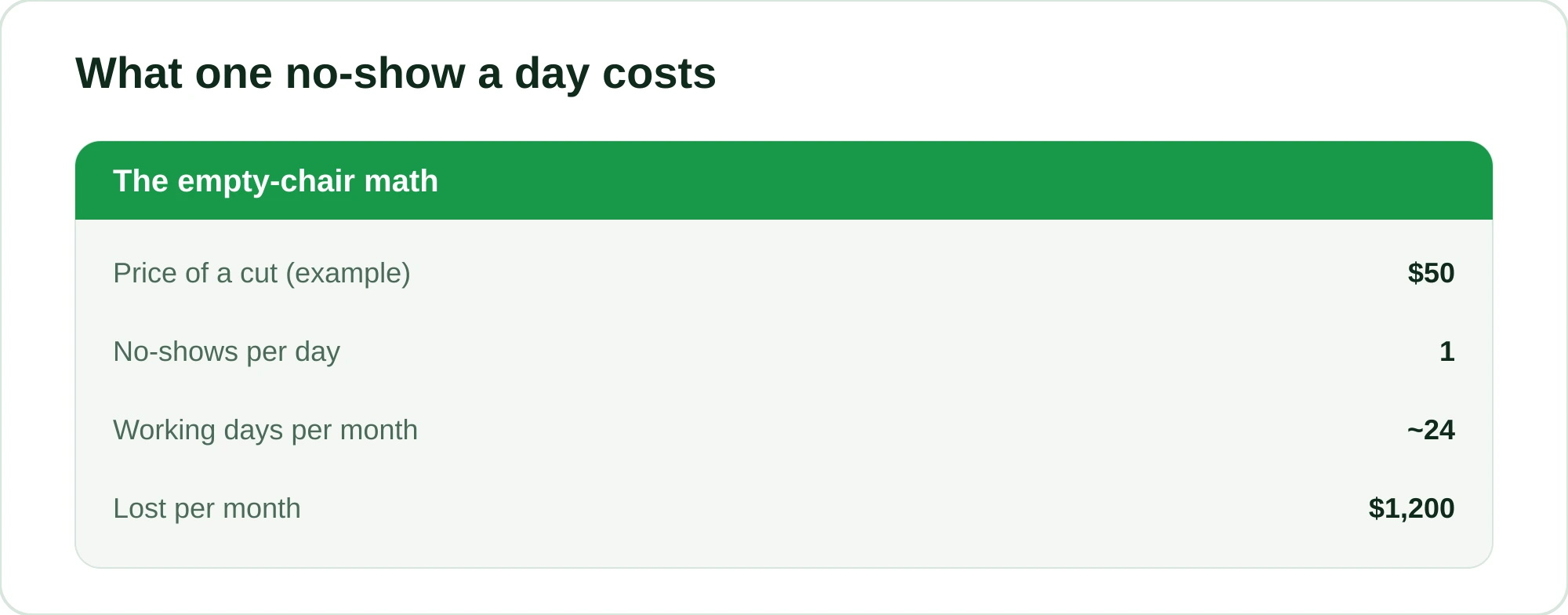
Now put it all together. Say your barbershop charges $50 a cut (an illustrative figure). One no-show a day over about 24 working days is $1,200 a month walking out the door. The notebook never shows up in that math, but it's what keeps the hole open.
What changes when your schedule goes online
Online booking isn't "a notebook on a screen". The difference is what it does on its own while you're cutting hair.
- Automatic confirmations and reminders. The client gets a message the day before without you lifting a finger. They confirm, cancel in advance or reschedule, and the slot doesn't go to waste.
- One schedule, no clashes. Once a slot is booked, it locks. Two clients can't land in the same slot with the same professional.
- Clients book themselves, any time. Sunday night, a holiday, 3 am. The schedule is open even when the shop is closed.
- History ready to use. Who came in, how much they spent, how long since their last visit. Everything is recorded without you adding anything up.
- Cloud backup. Your phone hits the floor, you open the schedule on another device and everything is still there.
If you want to see how to make that routine run smoothly, read How to Organize Your Barbershop Schedule Without the Chaos or, for beauty businesses, How to Organize Your Beauty Salon Schedule.
Paper vs. online, side by side
| Day to day | Paper appointment book | Online booking |
|---|---|---|
| Confirming with the client | You call one by one (or forget) | Automatic message the day before |
| Client booking after hours | Impossible | Any time, on their own |
| Risk of double booking | High | Practically zero |
| Backup if it's lost | None | Everything in the cloud |
| Seeing who stopped coming | Flip pages and hope | A ready list in seconds |
| Several professionals | Turns into a mess | Each one with their own schedule |
| Taking a deposit | By hand, if at all | Online payment link (card) at booking |
Paper isn't wrong. It just makes you do by hand everything the digital version does on its own. And your hands are already busy holding the scissors.
Where RobotiZap comes in
Most online booking tools ask the client to download an app or create an account. In practice, a lot of people give up halfway. RobotiZap solves that by working where your clients already spend their whole day: WhatsApp.
Here's how it works: a virtual assistant handles conversations on its own, 24 hours a day, with no app to install and no login for the client. It can work in two modes. In step-by-step mode, it sends a menu and the client picks the service, the professional and the time. In AI mode, it understands free text and even voice messages: the client writes "can you fit me in for a cut and beard trim tomorrow afternoon?" and the assistant takes care of it. For the details, see WhatsApp AI Booking: How It Actually Works.
There's real infrastructure behind it. RobotiZap is a Meta-certified Tech Provider and uses the official WhatsApp API, which carries far less risk of getting banned than the makeshift bots people run on a personal number.
As for no-shows, where the notebook bleeds the most: on top of automatic reminders and confirmations, you can take a deposit through an online payment link (card) at the moment of booking. Someone who has paid part of the price upfront almost always shows up.
On the management side, it covers what a real barbershop or salon needs:
- Several professionals, each with their own schedule
- Calculated commissions (global, per service or per product)
- Prepaid packages and a loyalty program with points
- Win-back of inactive clients and recurring appointments
- Retail sales at the front desk, home-visit bookings by ZIP code and reviews after the appointment
RobotiZap has a single plan, with unlimited bookings and professionals and AI mode already included. And you can try it with a free trial.
How to move from paper to online without the pain
Almost every owner is afraid of having to shut the shop down to "set up the system". You don't have to. The switch can happen without drama.
- Set up the basics first. Your services, prices and professionals. Half an hour on a day off is enough.
- Run both side by side for a week. Keep the book open while the online schedule starts taking bookings. You compare them and build confidence.
- Turn on reminders right away. Even before moving everything over, switch on automatic confirmations. That's the change with the fastest payoff.
- Tell your clients once. "You can now book with me directly on WhatsApp, any time." Most of them love not having to call during the rush.
- Retire the paper when you're ready. No hurry. When you notice you haven't opened the book in a while, it has done its job.
The good part: since clients book through WhatsApp, you don't face the "but I'll have to teach everyone to use an app" problem. There's no app. It's the same conversation as always, except now it books appointments on its own.
Is it worth going digital?
If your shop is busy, has more than one professional or has already lost you a no-show that hurt, yes. Paper works while there are only a few clients and you can keep everything in your head. The day your schedule fills up, it becomes a bottleneck. The digital version doesn't get tired or forget. And it doesn't vanish when coffee spills on the counter.
It works. The real question is: how many empty slots are you still willing to lose before you at least give it a try?
Create your RobotiZap account and start your free trial. Let the virtual assistant book and confirm for you while you do what you do best: take great care of whoever is in the chair.
Frequently asked questions
Does a paper appointment book still work for a small barbershop?
It works while it's just you and traffic is light. The problem shows up when a second professional joins, the phone starts ringing mid-cut or no-shows become routine. That's when paper starts costing more than it seems.
Will my clients need to download an app to book online?
Not with RobotiZap. Booking happens inside the WhatsApp they already use, with nothing to install and no sign-up. They chat as usual and the virtual assistant books the appointment.
Does online booking really help reduce no-shows?
Yes, because it sends confirmations and reminders on its own and also lets you take a deposit through an online payment link (card). The drop varies from shop to shop, but for many businesses that alone makes the switch worth it.
Is it hard to move everything from the notebook to digital?
You don't have to move everything at once. Set up your services and professionals, run both in parallel for a few days and retire the paper when you feel confident. The initial setup takes just a few minutes.
How much does RobotiZap cost?
RobotiZap has a single plan, with unlimited bookings and professionals and AI mode already included. You can start with a free trial. Current pricing is on the RobotiZap website.