15 Appointment Confirmation Message Templates
Why the appointment confirmation message decides whether the client shows up
A client booked on Tuesday for Friday at 3 pm. Friday comes, the chair sits empty, and you find out he "thought it was Saturday." That gap in your schedule almost always starts with a sloppy appointment confirmation message, or one that was never sent.
The confirmation is your last point of contact before the appointment, and it's where you settle what matters: day, time, professional, service, price and what happens if they don't show. When the message is clear, the client glances at it and the day and time stick. That's one less "I thought it was Saturday."
Here's a swipe file: 15 ready-made templates, grouped by situation. There are templates for barbershops and salons, with and without a deposit, for rescheduling and for reminders. Copy them, swap the brackets for your details and use them today. At the end, I'll show you how to put all of this on autopilot so you don't have to type a single message.
How to use these templates
Three quick rules before you copy:
- Replace everything in [brackets] with real details: name, service, date, time, professional, address.
- Keep it short. Clients read in the hallway, on the bus, between one thing and the next. A giant message doesn't get read.
- Always ask for a clear reply. "Can you confirm?", "Reply YES", "Does that work?". No ask, no confirmation.
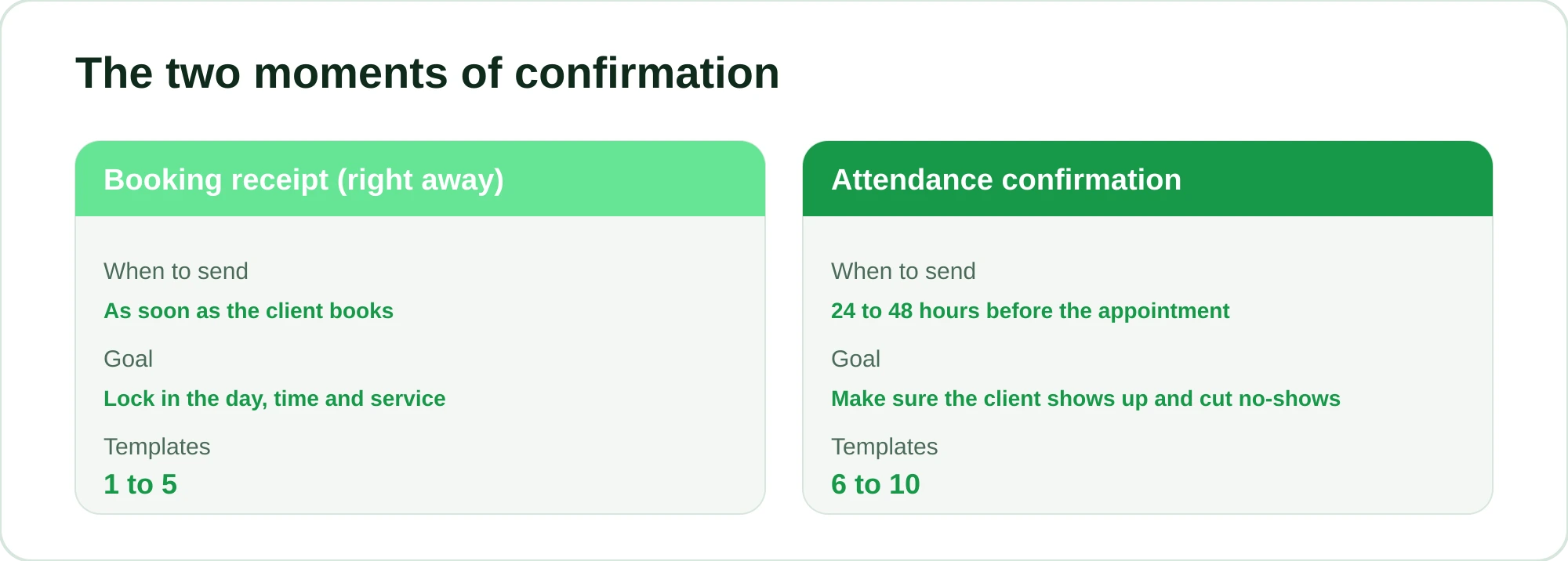
It's worth separating two things, because confirmation happens at two different moments. The booking receipt (sent as soon as the client books) and the attendance confirmation (sent close to the day, to make sure they're coming). Both show up in the templates below.
Confirmation templates for the moment of booking
These go out as soon as the slot is set. They work as a receipt and settle all the details.
1. Barbershop, straight to the point
You're all set, [Name]! Your appointment is booked: ✂️ [Service] 📅 [Day], [date] at [time] 💈 With [Professional] Need to change anything? Just message me here. See you then!
2. Salon, warm tone
Hi [Name]! Your appointment is confirmed 💕 💇 [Service] 📅 [Day], [date] at [time] 👩 With [Professional] We're looking forward to seeing you! If you need to reschedule, just let me know here.
3. With an active confirmation request
[Name], I've got you down for [Service] on [date] at [time] with [Professional]. Can you confirm by replying YES? That way your spot is guaranteed. 😉
4. When the service needs some prep
Hi [Name]! Confirmed: [Service] on [date] at [time]. A tip so everything goes smoothly: [come with dry hair / skip styling products that day]. Any questions, just message me!
5. With address and directions (new client)
Awesome, [Name]! You're booked for [date] at [time] with [Professional]. 📍 We're at [address], [landmark]. See you there! If it's your first visit, try to arrive about 5 minutes early. 🙌
Attendance confirmation templates (close to the day)
These go out 24 or 48 hours before. This is where you cut most no-shows. If the client doesn't reply, you still have time to offer the slot to someone else.
6. Simple reminder with a question
Hi [Name]! Your [Service] appointment is tomorrow, [date], at [time]. Are we still on? Just reply YES or NO. 🙏
7. With an easy way to reschedule
[Name], just a reminder about your appointment tomorrow at [time] with [Professional]. Can you make it? If you need to change it, let me know today and I'll find you another time. 😊
8. With a "this slot is in demand" nudge
Hi [Name]! Can you confirm your appointment on [date] at [time]? I have a waitlist for that day, so if you can't make it, let me know and I'll give the spot to someone who's waiting. Deal?
9. Barbershop, casual tone
Hey [Name]! Tomorrow at [time] you've got your cut with [Professional]. Still good? Send me a quick confirmed. 💈
10. Salon, long service
Hi [Name]! Just a reminder about your [Service] tomorrow at [time]. Since it takes a while, I've set that time aside just for you 💕. Can I confirm you?
Confirmation templates with a deposit
Charging a deposit keeps away the no-shows from clients who book without really committing. The message needs to explain the amount without sounding pushy. If you're still hesitant about charging one, read How to Charge Appointment Deposits Without Losing Clients and check your local consumer rules before choosing a template.
11. Deposit by online payment link, clear and friendly
Hi [Name]! To lock in your [Service] on [date] at [time], I ask for a deposit of [amount]. It counts toward your payment on the day. Here's the card payment link: [link]. As soon as it goes through, I'll send your confirmation. 🙌
12. Deposit with a deadline
[Name], your spot is reserved as soon as the [amount] deposit is paid. 📅 [date] at [time] with [Professional] Could you pay through the link by [time/deadline]? If not, the slot goes back into the schedule. Any questions, just message me.
13. Confirmation after the deposit goes through
Got it, [Name]! ✅ Your [amount] deposit is confirmed. Your appointment is 100% guaranteed: [Service], [date] at [time] with [Professional]. On the day, you only pay the remaining [balance]. See you then!
14. Cancellation policy together with the deposit
Hi [Name]! Deposit of [amount] received, and you're confirmed for [date] at [time]. 🎉 Just so we're on the same page: if you need to reschedule, let me know [24 hours] in advance and the deposit carries over to the new time. All good?
15. Rescheduling and keeping the deposit
[Name], no problem changing the day! Your [amount] deposit still stands. I have [option 1] and [option 2]. Which works better for you?
Which template to use in each situation
So you don't get lost picking one, here's a quick summary:
| Situation | Recommended template | When to send |
|---|---|---|
| The client just booked | 1 to 5 | At the time of booking |
| Making sure they show up | 6 to 10 | 24 to 48 hours before |
| Expensive or long service | 11 to 14 | At booking, with a deposit |
| The client wants to change the day | 7, 15 | As soon as they let you know |
| A client who has missed before | 8, 11 | At booking, with a deposit |
For the client who disappeared on the day, I put together specific messages in What to Text a Client Who Missed Their Appointment (5 Templates). They address it without burning the relationship.
How to automate it and never forget to confirm again
Copy and paste works when you have two or three appointments a day. But in a full week, with 40 bookings, you're not going to put down the scissors to send confirmations one by one. And that's exactly when no-shows happen: nobody confirmed because nobody had time.
That's the job RobotiZap takes off your hands. It's a WhatsApp assistant that books and confirms on its own, 24 hours a day, without you touching your phone. It runs on the official WhatsApp API (we're a Meta-certified Tech Provider), so your account isn't at risk of a ban for using unofficial bots.
In practice, here's what it does with the messages in this post:
- Sends the booking receipt right away when the client books, with the service, date and professional already filled in.
- Sends the attendance confirmation 24 or 48 hours before, automatically, and records who replied YES. For the step-by-step setup, see Automatic WhatsApp Appointment Reminders: How to Set Them Up.
- Collects the deposit through an online payment link (card) and only locks in the slot once the payment goes through, so you don't have to check receipts.
- Handles the client from start to finish, in step-by-step mode or with AI that understands free text and even voice messages, booking the appointment without you in the middle.
The client doesn't download an app or create a password: they chat on WhatsApp the way they'd chat with you. And your schedule stays organized, with your professionals, commissions and packages all in one place.
RobotiZap has a single plan, with unlimited bookings and professionals. Think about what an empty chair costs you on a Friday afternoon. Every haircut or blowout that no longer turns into a no-show is a slot you keep, plus time you save and clients who show up because they were reminded at the right moment.
You can try it free, with no long-term contract. Create your account, connect your WhatsApp and watch your confirmations go out automatically: start your free trial here.
Frequently asked questions
When is the best time to send an appointment confirmation message?
To confirm attendance, 24 to 48 hours before usually works well. It's early enough for you to rearrange the schedule if the client can't come, and close enough that the day is already on their mind. The booking receipt, on the other hand, goes out as soon as the appointment is booked.
Should I ask for confirmation or just notify the client?
Ask for active confirmation. A message that only states the time is easy to ignore. When you end with "reply YES" or "can you confirm?", the client has to make a decision, and that makes it much more likely they'll show up or let you know in time.
Does charging a deposit drive clients away?
In many cases it's the opposite: the deposit filters out people who would book without committing and keeps those who really want the slot. The key is the tone of the message. Templates like 11 and 13 explain that the amount counts toward the final payment, which removes the feeling of an extra charge.
Can I automate these messages without sounding like a robot?
Yes. With RobotiZap you personalize the name, service and professional in every message, so the client gets text that feels handwritten. In AI mode, the assistant also answers questions in natural language, by text or voice, without the stiffness of a numbered menu.
How many confirmation messages should I send per appointment?
In most cases, two are enough: the receipt at booking and the attendance confirmation close to the day. For expensive services or ones with a deposit, a third message confirming the payment was received is worth it. Anything more turns into spam and wears the client out.