Birthday Messages for Clients: 10 Ready-to-Use Templates
Why a birthday message fills slots, not just makes clients smile
Every day, one of your clients has a birthday. You just don't know which one. And a birthday message for a client, when it comes with a real offer, is one of the cheapest reasons there is for someone to stop what they're doing and book an appointment.
Think about the person having the birthday. They want to look good for the party, the dinner, the photos. Hair, beard, nails, brows, a blowout. If your message lands on their phone a week before, with a little treat, you're pushing on a door that's already half open.
The problem is always the same: nobody remembers. The day's appointments swallow everything. The birthday goes by, the client goes to the competitor around the corner and you never even find out. This post solves both ends. First, ten ready-made templates to copy and paste. Then, how to make them go out on their own, every day, without you writing birthdays down in a notebook.
Ground rules before you copy any template
A good template used badly turns into spam. Before you start sending, get four things right:
- Send it as your business, not as a stranger. The client needs to know from the first line that it's your barbershop or salon.
- Include an offer with a deadline. "Happy birthday" on its own is nice and forgettable. "Happy birthday, and your haircut is X off until such-and-such a date" is nice and fills slots.
- Make yes easy. Always end with a question they can answer: "Want me to save you a slot?" Don't make the client call or open a complicated link.
- Don't overdo the discount. A fair treat (an extra service, 15% to 20% off, a free brow tidy with a haircut) already works. You don't need to burn your margin to be remembered.
Wherever you see [ ], swap in your own details. The percentages here are examples; adjust them to your prices.
10 birthday message templates for clients
1. Short and direct (barbershop)
Hey [Name]! It's [Barbershop]. Just stopping by to wish you a happy birthday, man! 🎉 And since it's a special month, your cut + beard is 20% off until [date]. Want me to save you a slot?
2. Warm (salon)
Hi [Name]! We hope your day is as lovely as you deserve. 🥰 It's [Salon], and we'd love to give you a gift: a free blowout with your next service any time during your birthday month. Shall we book you in?
3. "Look your best for the big day"
Happy birthday, [Name]! 🎂 Since there's a celebration coming up, how about showing up looking amazing? I'm holding a slot with [Professional] for you this week at 15% off. Tell me the best day and I'll confirm it.
4. A free extra service (without touching the price)
Happy birthday, [Name]! 🎈 During your birthday month, every haircut comes with a neckline cleanup and beard touch-up on us. It's our way of saying thanks for being one of our regulars. Want to book?
5. Long-time loyal client
[Name], today is your day and I couldn't let it pass. 🎉 You've trusted us for [X] years, and that means a lot. I've set aside a special birthday treat for you this month. Come in and I'll tell you all about it. When can I fit you in?
6. With a free product (boosts retail sales)
Happy birthday, [Name]! 🎁 Book your appointment by [date] and take home a free [pomade/hair mask/oil] on the day. It's gift week, so make the most of it. Want me to reserve a slot?
7. Laid-back tone (younger clients)
Hey, birthday legend! 🥳 Ready to get that hair looking sharp for the celebration? [Barbershop] is giving you 20% off your cut this week as a gift. Swing by, [Name]. What day works for you?
8. Elegant (upscale salon)
[Name], we wish you a birthday full of wonderful things. ✨ As a courtesy, we've prepared a special deep-conditioning treatment as a gift with your next appointment this month. It would be a pleasure to welcome you. Which day do you prefer?
9. Winning back a client who's been away
Hi [Name]! It's been a while since we've seen you, and your birthday is the perfect excuse to change that. 🎉 Come back this month and your service is 25% off. We miss seeing you looking your best! Shall we book you in?
10. Birthday + referral (brings in new people)
Happy birthday, [Name]! 🎂 This month, on top of your birthday discount, anyone you refer also gets 15% off their first appointment. Why not celebrate by bringing a friend? Let me know and I'll set up both appointments.
How to choose the right template
Don't use all ten. Pick one or two based on the client:
| Client situation | Template that fits |
|---|---|
| Comes in all the time, a regular | 5 (loyal) or 8 (elegant) |
| Has been gone for months | 9 (win-back) |
| Younger clients | 7 (laid-back) |
| You want to push retail sales | 6 (free product) |
| You want to bring in new clients | 10 (referral) |
| Not sure which to use | 1 or 2 (short and safe) |
Template 9, the win-back, speaks directly to clients who've drifted away. If that describes a big part of your client list, combine your birthday strategy with a broader effort on how to win back inactive clients on WhatsApp. And if you want a set of messages just for clients who've disappeared, there's a swipe file of win-back messages for clients who've gone quiet that fits well here.
The real problem: remembering the date every single day
The templates are the easy part. The hard part is sending them at the right time.
For a birthday message to work, it has to arrive close to the date, every day of the year, without fail. That means someone has to record every client's birthday, open a list every morning, check who has a birthday today or this week, copy the template, change the name and send them one by one. In a busy week, that routine doesn't survive. It never does.
That's why most barbershops and salons have an "idea to send birthday wishes" that never became a habit. Everyone wants to send them. Almost nobody actually does.
The way out is to take it off your plate. You stop relying on your memory: the system stores the date and sends the ready-made message on its own.
How to automate birthday messages on WhatsApp
RobotiZap is a WhatsApp assistant that books appointments on its own, 24 hours a day, for service businesses. It answers clients, books appointments and also handles the messages that usually get put off, like birthday wishes.
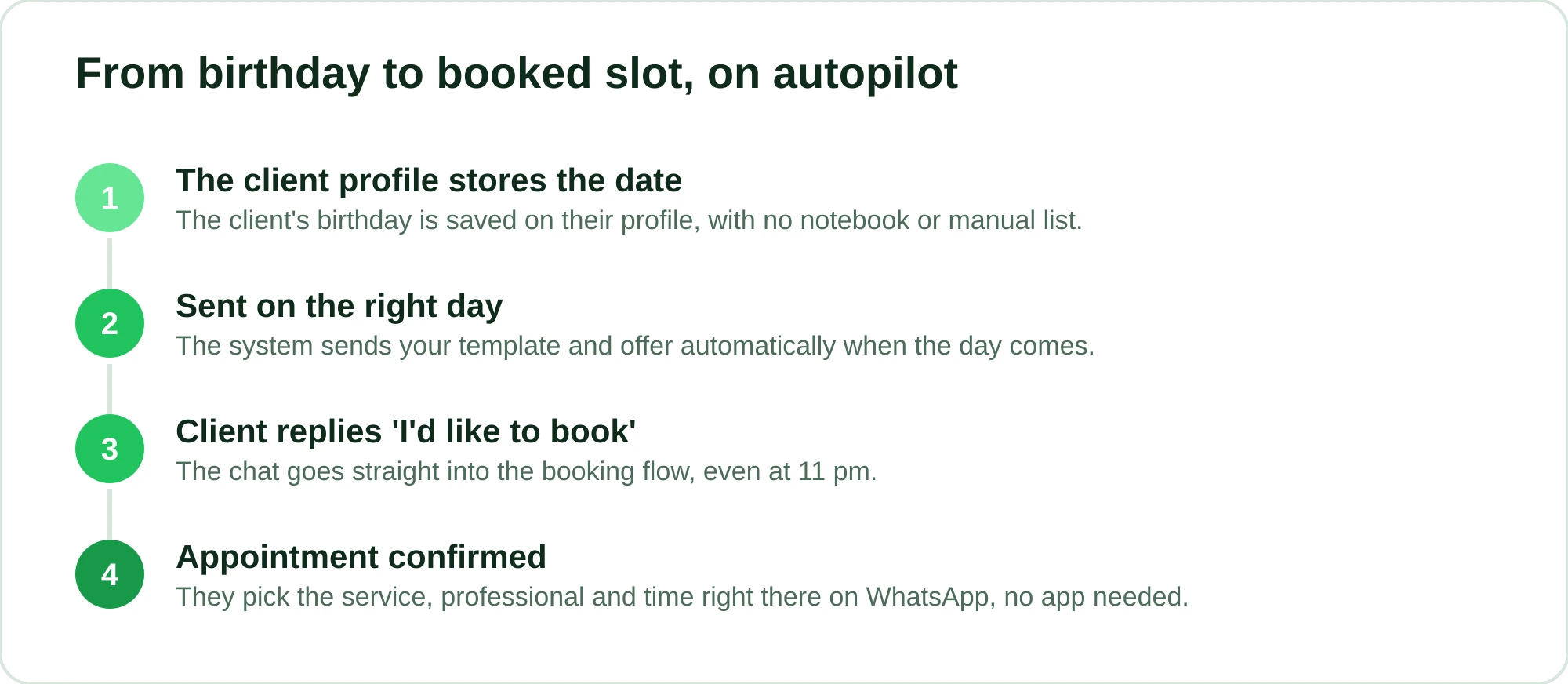
Here's how it works for birthdays: the client's profile stores the date, and the system automatically sends the birthday message when the day comes, with your template and your offer. You write it once, and it repeats forever, for every client with a birthday, without you opening any list.
The conversation doesn't stop at the message either. Because RobotiZap is also your shop's virtual receptionist, when the client replies "I'd like to book", they go straight into the booking flow. The client picks the service, professional and time right there on WhatsApp, with no app to download and no sign-up. There are two modes: a step-by-step menu, or conversational AI that understands free text and even voice messages, for clients who'd rather send a quick "hi, I'd like to book for Friday morning".
A few things that make a difference day to day:
- Official WhatsApp API. RobotiZap is a Meta-certified Tech Provider. Sending messages at scale outside the official API is the fastest way to get your number banned. Here the risk is much lower.
- Whoever replies can book right away. An interested client doesn't have to wait for you to see the message. They book on the spot, even at 11 pm.
- Fewer no-shows. Booked? The system sends an automatic reminder and asks for attendance confirmation. For pricier services, you can collect an appointment deposit through an online payment link (card).
The birthday message is just one piece of the machine. The same system handles automatic appointment reminders, confirmations, points-based loyalty, commissions for multiple professionals with separate schedules, prepaid packages and win-back for clients who've disappeared. All in the same WhatsApp.
Is it worth it just for this?
Think about what each birthday booking means: a client who might have slipped away books again, often adds an extra service for the occasion and keeps coming back afterward. And birthday messages are only one part: 24/7 booking, fewer no-shows, commissions and loyalty all come with it.
RobotiZap has a single plan, with unlimited bookings and professionals, AI included and no extra RobotiZap charge for volume (on the official API, Meta charges its own per-message fees separately). There's a free trial with no long-term commitment. Turn it on, add your clients, write your birthday message once and let it run.
Create your account and try it: app.robotizap.com/register. If you'd rather see everything it does first, take a look at robotizap.com.
Frequently asked questions
What's the best time to send a birthday message?
The morning of the birthday works well as a thoughtful touch. But to fill slots, sending it a few days early usually works better, because it gives the client time to book before the celebration. A good practice is to send your wishes on the day and keep the offer valid for the whole month.
Do I need to offer a discount in a birthday message?
Not necessarily, but it helps a lot. A plain "happy birthday" is kind and rarely turns into a booking. If you don't want to touch your prices, offer a free extra service: a neckline cleanup, a brow tidy, a deep-conditioning treatment. The client feels the treat and you keep your margin.
Can I send birthday messages to lots of clients without getting banned?
Yes, as long as it's through the official WhatsApp API. Mass messaging through unofficial apps is what takes down business numbers most often. RobotiZap uses the official API as a Meta-certified Tech Provider, which lowers that risk considerably.
How does the system know a client's birthday?
The date is stored on the client's profile. You can fill it in as you serve clients, and the booking flow itself helps collect this information over time. After that, the message goes out on the right day on its own.
Can I customize the message template?
Yes. You write the text in your shop's own voice, with the tone and offer you want, and the system simply sends it on the right date and inserts each client's name. Write it once and use it all year.