12 Deposit Request Message Templates for Appointments
Writing a deposit request message is where you freeze
You decide to start taking deposits, you work out the rule in your head, and then, when it's time to type the deposit request message on WhatsApp, your hands freeze. There's that fear of sounding rude and watching the client disappear. So you don't ask for anything, the slot stays reserved, the client doesn't show up and the chair sits empty all afternoon.
The problem is almost never the deposit itself. It's how you ask. The same sentence can sound like "I trust you and want to make sure your slot is safe" or like "I think you're going to flake on me". The difference is in the choice of words.
Here are 12 templates sorted by situation. They're short, polite texts you can copy, swap in the name and the amount, and send. At the end, I'll show you how to put all of this on autopilot so you don't have to type anything each time.
Before you copy: 3 rules that make the message work
The templates below already follow these rules, but it's worth understanding why so you can adapt them to your business.
- State the amount and what it covers. "A $20 deposit that goes toward the price of your service" sounds much better than "I need a deposit". The client understands they're not losing money.
- Keep payment one tap away. If the client has to ask for your payment details, wait for you to reply and come back later, half of them give up along the way. Sending the payment link right away solves it.
- Treat it as house policy, not an exception. When you say "we hold appointments with a small deposit", it sounds like the norm. When you say "I'm going to have to charge you a deposit", it sounds like distrust.
If you're still unsure how much to charge and when, read How to Charge Appointment Deposits Without Losing Clients. And if you're wondering whether deposits are allowed at all, check your local consumer rules.
Templates for asking for a deposit at booking
These are the ones you'll use most. The client has just asked for a slot and you reply, fitting the deposit in naturally.
1. Simple and direct
Hi [Name]! I've reserved your [service] on [day] at [time]. To confirm it, we ask for a deposit of [amount], which goes toward your total. You can pay right here: [payment link]. As soon as it comes through, I'll send you the confirmation.
2. Lighter tone, for a younger crowd
Done, [Name]! Your [service] is set for [day], [time]. To lock it in, just a [amount] deposit (it comes off the final price). Here's the link: [payment link]. Hit me up if you need anything.
3. Salon with a higher-priced service (color, extensions)
Hello [Name]! For your [service] on [day] at [time], we've reserved extra time in your stylist's schedule. That's why we ask for a deposit of [amount], which is deducted from the total on the day. You can pay by card at this link: [payment link]. Once the deposit is in, your appointment is guaranteed.
4. When the client asks "can you hold the slot for me?"
Sure thing, [Name]! The way to hold it is with a deposit of [amount]. It goes toward the price of your [service], so you don't pay anything extra. Here's the link: [payment link]. Sound good?
Templates for new clients or clients who tend to miss appointments
The tone shifts a little here. With someone you don't know, or someone who has already missed an appointment, you can be a bit firmer without losing your manners.
5. A new client's first booking
Hi [Name]! Great to have you with us for the first time. Since this is your first appointment, the booking is confirmed with a deposit of [amount] (which comes off the price of your [service]). It only takes a moment: [payment link]. See you on [day]!
6. A client who has missed before (without calling them out)
Hi [Name]! I've saved your [service] for [day], [time]. To make sure the chair is held just for you, the booking is confirmed with a deposit of [amount], deducted on the day. Link here: [payment link]. All good?
7. Peak times (Saturday, the day before a holiday)
[Name], Saturdays fill up fast and lots of people end up on the waitlist. To lock in your [service] at [time], we confirm with a deposit of [amount], which goes toward your total. You can pay here: [payment link]. That way nobody takes your spot.
Templates for when the client questions the deposit
It will happen. Someone will ask why they have to pay upfront. Answering calmly and explaining the reason usually settles it on the spot.
8. "Why do I have to pay upfront?"
Fair question, [Name]! The deposit just makes sure the slot is held for you and not for someone else. It's not an extra charge: the amount goes toward the price of your [service]. On the day, you only pay the difference. Okay?
9. "What if I need to reschedule?"
No problem, [Name]! If you need to reschedule, just let me know [e.g. 24 hours] in advance and I'll move your deposit to the new time, so you don't lose anything. We just ask for notice so we can offer the slot to someone else.
10. A regular client surprised by the change
Hi [Name]! Just letting you know about a change here at [business name]: from now on we confirm appointments with a small deposit of [amount], which comes off the price of your service. For regulars like you, almost nothing changes. It just helps us keep the schedule organized and avoid empty slots. Any questions, just message me!
Payment follow-up and reminder templates
For when the deposit was agreed but the payment hasn't come through yet, or to remind the client close to the day.
11. Polite reminder about a pending deposit
Hi [Name]! Your [service] on [day] at [time] still has a pending deposit. To confirm it for good, just pay here: [payment link]. If it doesn't come through by [e.g. tonight], the slot goes back on the schedule. But there's still time to lock it in.
12. Confirmation once the deposit is in
Got it, [Name]! Deposit confirmed, and your [service] is guaranteed for [day], [time]. See you then! If you need to reschedule, just let me know in advance.
Quick comparison: which template to use when
| Situation | Templates | Tone |
|---|---|---|
| Regular booking | 1, 2, 3, 4 | Light and standard |
| New client or frequent no-show | 5, 6, 7 | Firm and polite |
| Client questions it | 8, 9, 10 | Explanatory |
| Pending payment / confirmation | 11, 12 | Direct |
How to automate deposit collection (and stop typing)
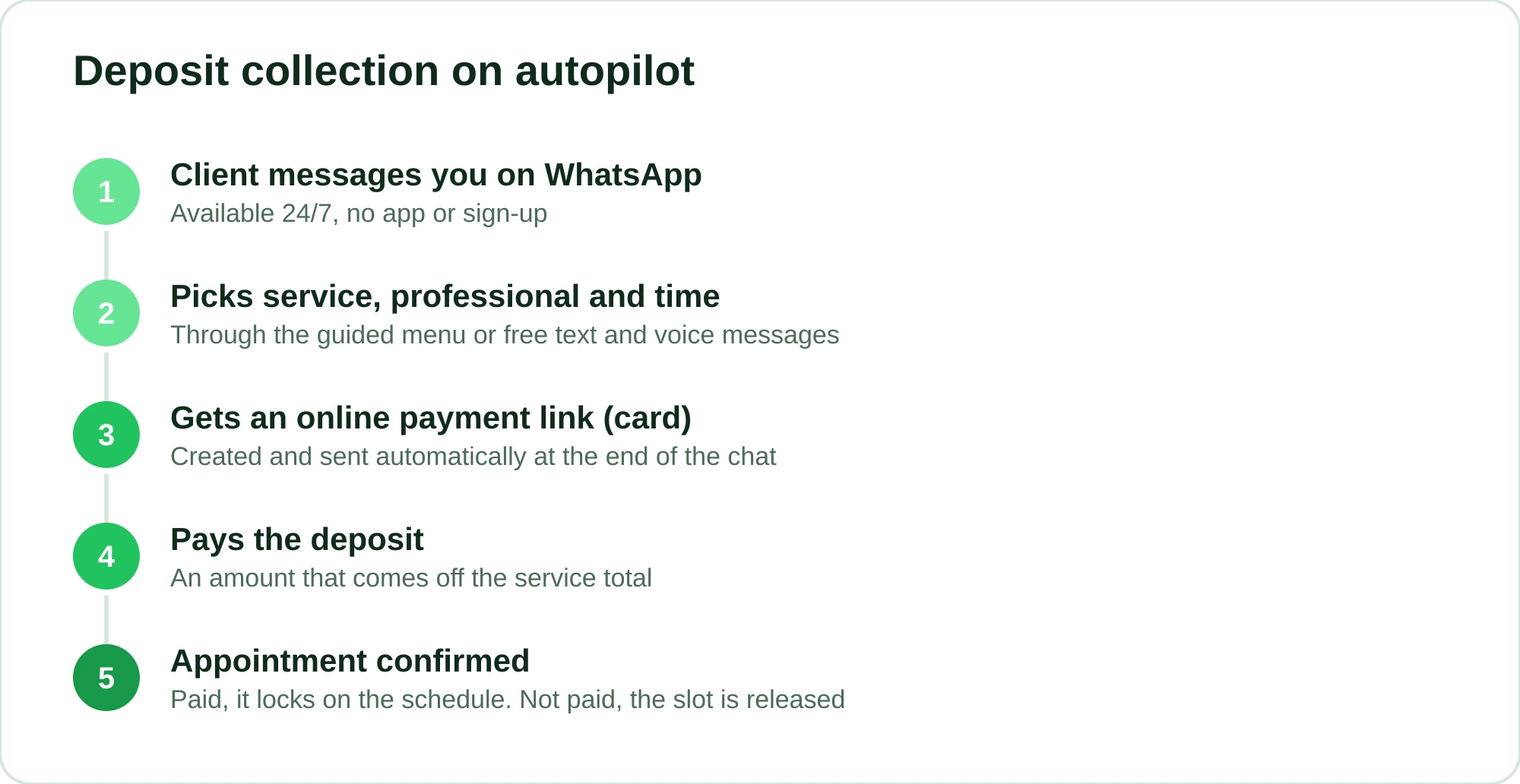
Copying and pasting messages works, but it has two gaps. First: you forget to ask for the deposit when the shop is packed, which is exactly when you need it most. Second: the payment link depends on you having your phone in hand to send it.
You can take that off your plate. In RobotiZap, the virtual assistant handles booking on WhatsApp 24 hours a day and asks for the deposit on its own at the end of the conversation. The client picks the service, the professional and the time, and gets an online payment link (card) right away, without you having to step in. Deposit paid, appointment confirmed. Deposit not paid, the slot isn't locked.
The menu doesn't box the client into a single path either: the assistant works in two modes. Step-by-step mode offers a short guided menu, and AI mode understands free text and even voice messages from the client, like "I'd like a cut and a beard trim Saturday morning". The person on the other end doesn't need to download an app or sign up. It's just regular WhatsApp.
Because RobotiZap runs on the official WhatsApp API (the company is a Meta-certified Tech Provider), you can send reminders and deposit requests without worrying that your number will get banned, which is a real risk for anyone running an unofficial bot behind a regular WhatsApp account.
About the cost: RobotiZap has a single plan, with unlimited bookings and professionals. Every no-show the automatic deposit prevents is a slot you actually get paid for, and you get AI mode and reminders on top. You can start with a free trial.
Try RobotiZap for free and put deposit collection on autopilot.
Frequently asked questions
What's the right amount for an appointment deposit?
There's no fixed number, but the most common approach is to charge between 20% and 50% of the service price, or a small flat amount (say $10 to $20) that covers part of your time if the client doesn't show. What matters is that the amount goes toward the final price, not on top of it. In many cases, even a small deposit is enough to cut no-shows noticeably, because it creates commitment. For a step-by-step guide to how much and when to charge, see How to Charge Appointment Deposits Without Losing Clients.
Does asking for a deposit scare clients away?
When the message is polite and makes it clear the amount comes off the total, pushback is usually low. Someone who walks away over a $20 deposit would probably have skipped the appointment without paying anything. People who value their own time understand it's just about keeping the schedule organized. The secret is the tone, and the 12 templates above were written with that in mind.
How do I send the payment link with the message?
The simplest way is to create an online payment link (card) and paste it straight into WhatsApp. Doing that by hand for every booking is tedious. With a tool like RobotiZap, the link is created and sent automatically at the end of the booking conversation, so all you have to do is get the notification that the deposit came in.
Can I transfer the deposit if the client reschedules?
Yes, and it usually makes the rule feel lighter. Set a deadline (for example, 24 hours' notice) and move the same deposit to the new time. Template 9 above already has that explanation ready. That way you protect your schedule without seeming inflexible.
Do I need a system to collect deposits, or can I do it by hand?
You can start by hand, copying the templates in this post and creating a payment link for each booking. The problem shows up with volume: when your schedule is full, you forget to ask, you waste time typing and you depend on having your phone free. Automating solves all three at once and makes sure no deposit slips through.